
The Loader Summary Results Summary by Grade/Gender Report summarizes the Loader results by student gender and/or grade and lists the number of students with fully scheduled requests. Each row consists of the gender and/or grade combination and lists the three following items for the gender and/or grade combination: Number of Students, Number of Fully Scheduled Requests, and Percentage of students with fully scheduled requests. (Remember that if you have excess requests for many students –more requests than can physically fit in their schedule – those students will not show as completely scheduled because they still have pending Course Requests. Conversely, students with too few requests – fewer requests than the number that would comprise a full schedule –may show as completely scheduled because if all their requests have been fulfilled, although their schedule will still have holes, their requests are fully scheduled.)
While details specific to this report will follow, users can find general information about reports within the Reports documentation.
Loader Results Summary by Grade/Gender Report is located within Reports in the Schedule menu in Q.
- Report Title – The report title defaults to Loader Results Summary by Grade/Gender unless changed by the user
- Track – Select a track to report from within the logged-on school
- Grade – The user may select specific grade levels by clicking the All link and selecting desired grades. The report defaults to All courses.
- Gender – the user may select specific gender by clicking the All link and selecting desired gender. The report defaults to All gender
- Alternate Row Shading – Check this option to include shading
- Disable all Shading – Check this option to remove all shading from report
Sample Loader Results Summary by Grade/Gender
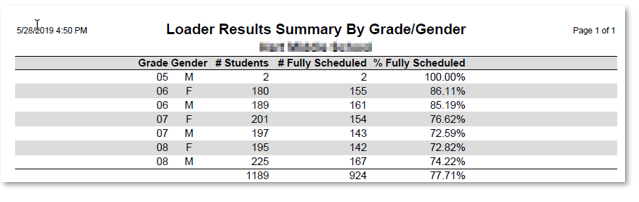
The Loader Results Summary by Grade/Gender Report shows the percentage of students fully scheduled and is looking at the total number of students. Always keep in mind that even though a student is listed as fully scheduled it's still possible that they have holes in their schedule. This would occur if they didn't have enough requests to fill every period.
