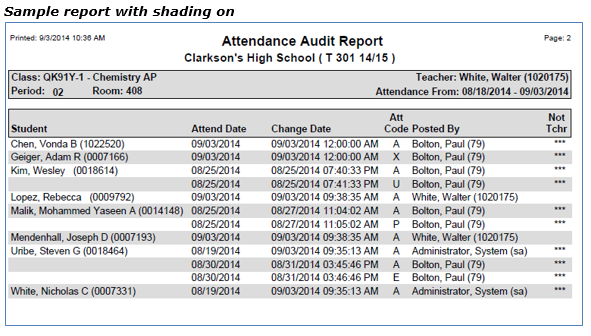
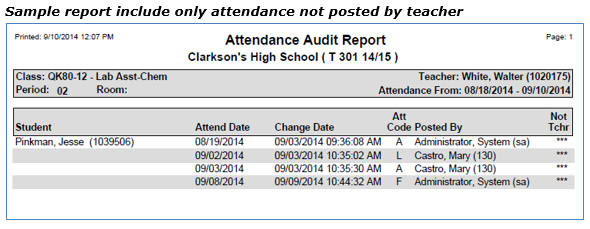
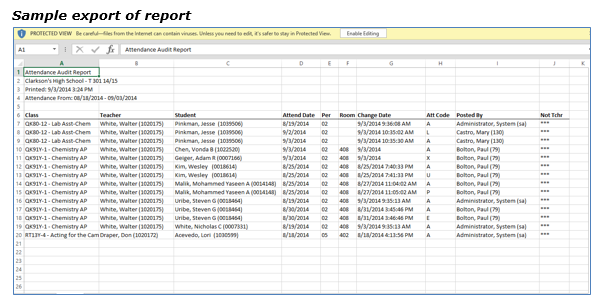
The Q Attendance Audit Report is an auditing tool that provides a listing of changes that have been made to student attendance records. Records can be filtered by specifying an Attendance Date range and/or a Change Date range.
While details specific to this report will follow, users can find general information about reports within the Reports documentation.
Attendance Audit Report is located within Reports in the Attendance menu in Q.
Report Options
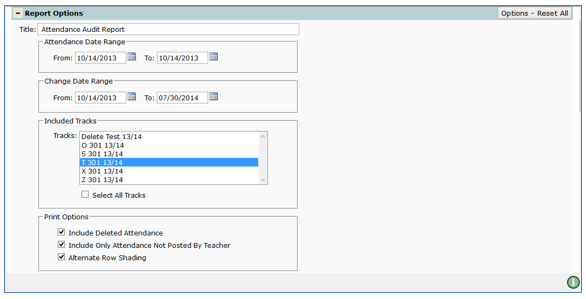
The Attendance Audit Report offers the following options:
- Title – The default title upon launching the report is Attendance Audit Report, however it may be customized and allows for use of specialized characters
- Attendance Date Range – The dates entered in the From and To fields determine the range of dates for attendance entries. The report defaults to the system date
- Change Date Range – The dates entered in the From and To fields define the date range for any changes to the original attendance entries
- Included Tracks – District schools are available when login is to the district. Otherwise, defaults to login school
- One or more tracks may be selected. Select multiple tracks by holding down the Ctrl or Shift key and left-clicking on each track
- If the Select All Tracks box is checked, the report will include records from all tracks for the login school
- Print Options
- Include Deleted Attendance – if selected, the report will include deleted attendance records
- Include Only Attendance Not Posted by Teacher – if selected, the report will include only changes posted by faculty other than the teacher. The report designates Faculty other than Teacher by *** in the Not Tchr column
- Alternate Row Shading – Turns on shading for every other row of student names
Example Reports
NOTE: Reports may look different depending on options, selections and sort order choices