
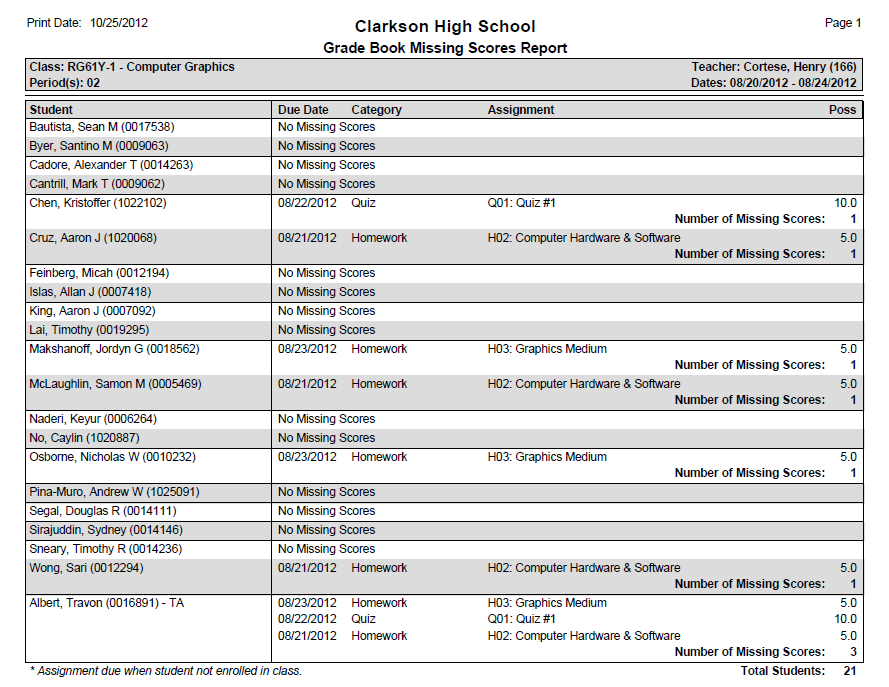
The Grade Book Missing Scores report produces a roster of students who have assignments with missing scores (no score entered after the Due Date). Under each student entry is a list of qualifying assignments and a subtotal of missing scores per student.
For reference purposes, this report will also denote assignments that have Due Dates outside of a student's enrollment dates with an asterisk (*).
While details specific to this report will follow, users can find general information about reports within the Reports documentation.
Grade Book Missing Scores Report is located within Reports in the Marks menu in Q.
Report Options
The Grade Book Missing Scores report provides the following options: 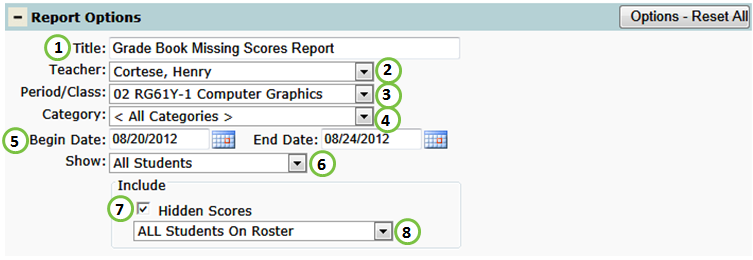
- Title - include a custom title or leave at its default title.
- Teacher - select a desired teacher.
- NOTE: Only teachers who have set up their grade book will be available.
- Period/Class - select a desired class.
- NOTE: Only class who have at least one grade book assignment will be available.
- Category - select all categories or a paticular grade book category to filter the report by.
- Begin and End Date: Enter or select the missing assignment due dates you would like on the report.
- Show: select All Students scheduled in class or Actively Enrolled Students.
- Include Hidden Scores - include any missing assignments that have been flagged as hidden.
- Include: include ALL Students On Roster or ONLY Students With Missing Scores on the report.
Example Reports
Videos
