For districts using ParentConnection for their annual re-enrollment process, this report generates a list of students whose parent/guardian has completed the re-enrollment process, has not yet completed the re-enrollment process, or has no access to the online re-enrollment process. Re-enrollment progress can also be monitored on screen in the Re-Enrollment Manager application.
While details specific to this report will follow, users can find general information about reports within the Reports documentation. Most reports also include selection filters, and users can learn more about them in the Selection Filters documentation.
Re-enrollment Listing Report is located within Reports in the Enrollment menu in Q.
The following options may be applied to the report: 
- Title – The default title may be customized by user.
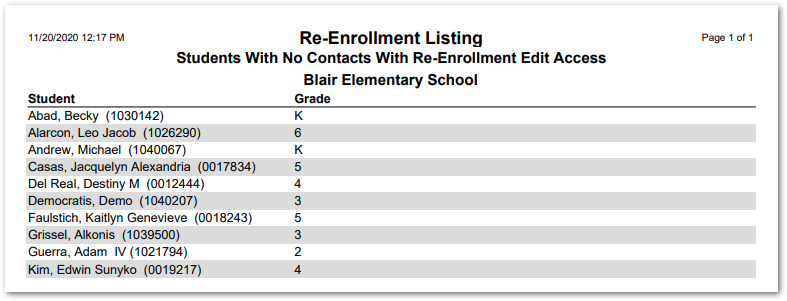
- Report Type –There are three available options. See the sample reports below.
- Completed Re-Enrollment
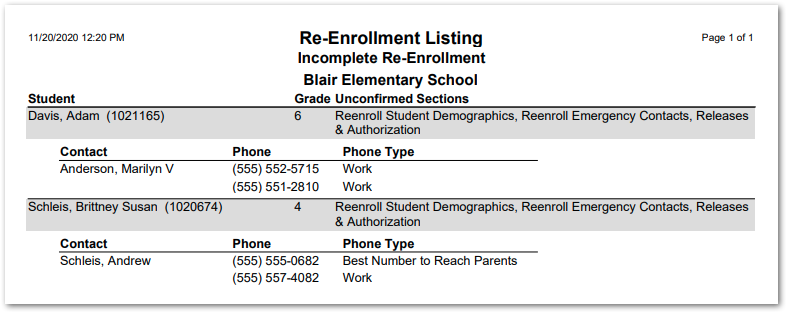
- Incomplete Re-Enrollment – This report type includes three additional options.

- Exclude students with no contacts with re-enrollment edit access – Uncheck to include such students in the report.
- Include Unconfirmed Sections – Lists the sections of the re-enrollment process where the contact has not checked the box to confirm the information in that section is complete and correct.
- Include Contacts – Check to include contact names and phone numbers.
- Students with no contacts with re-enrollment access
- Alternate Row Shading – Enable alternate row shading for readability.
- Disable All Shading – Check to remove all shading and save ink or toner when printing the report.
Completed Re-Enrollment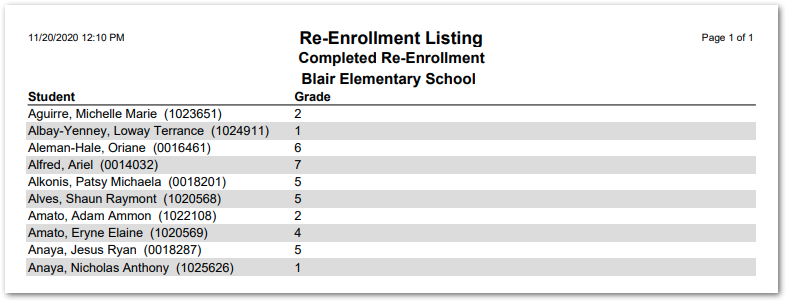
Incomplete Re-Enrollment
Students With No Contacts With Re-Enrollment Edit Access