
Q provides an interface with the Parchment transcript upload API. The Q Parchment Setup application provides an interface for defining Parchment authentication, and transcript upload parameters.
Parchment Setup is located under the System menu in Q.
The information to populate the Setup Information section of the screen will come from Parchment. The top 4 fields are used to authenticate to Parchment. The API Address and Paths are used to communicate with Parchment.
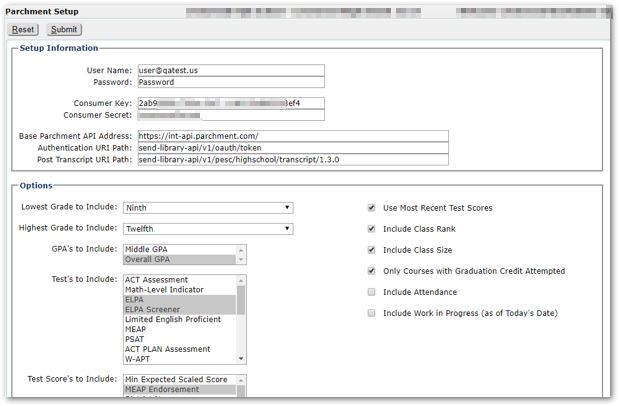
The Options you configure will determine the transcript information that is uploaded to Parchment. Configure the available options and adjust the settings for:
Lowest Grade to include
Highest Grade to include
GPA's to Include
Tests to Include
Test Scores to Include
Indicate with the checkbox whether or not to include:
Use Most Recent Test Scores - defaulted ON
Include Class Rank - defaulted ON
Include Class Size - defaulted ON
Only Courses with Graduation Credit Attempted - defaulted ON
Include Attendance
Inclulde Work in Progress (as of Todays's Date)
When settings and options are configured as desired, click Submit.
There are several Code Translations that need to be configured. To access these translations, select Lookup Editor under the System menu and then select the tab: Code Translations. The Parchment code translations are pre-defined and start with the text 'Parchment'.
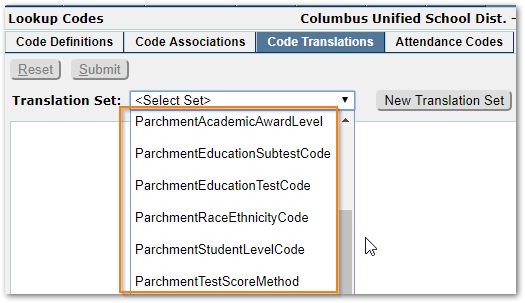
Each translation needs to have the External Code defined. The possible codes are defined in the PESC High School Transcript Format, version 1.3 PDF document. This document can be downloaded from the PESC.org website.
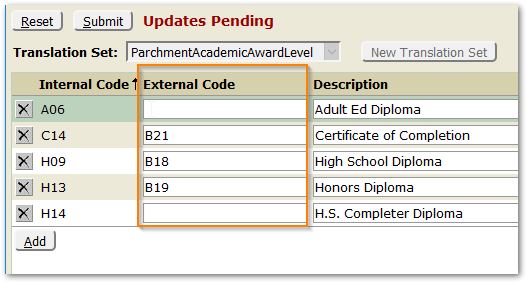
The Translations are:
- ParchmentAcademicAwardLevel
- ParchmentAcademicSummaryType
- ParchmentEducationSubtestCode
- ParchmentEducationTestCode
- ParchmentRaceEthnicityCode
- ParchmentStudentLevelCode
- ParchmentTestScoreMethod
Populate the external codes for all Parchment Code Translations listed, clicking Submit for each.
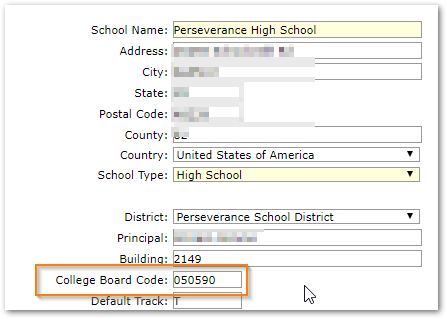
Parchment stores transcript by the School's College Board code. As a result, the College Board code is required and MUST be configured.
The College Board code may be configured and maintained for each school in the School Editor under the School Menu.
Once Parchment has been setup and configured, the application interfaces to upload transcripts to Parchment may be used.
- Mass Parchment Upload for uploading transcripts for a selected set of students. To be selected for upload, students are required to have a State ID.
- Access to the application is permissioned through the System: Mass Parchment Upload [Application] permission item.
- Users with permissions to Marks: Student Academic History [Transcript] will have a Parchment button enabling them to upload a single student's transcripts.
