
Did you know that 4.3.1 introduced a new feature in Class Marks that gives you more flexibility when working with calculated standards?
What’s New
A new preference has been added that allows mass filling of calculated standard marks.
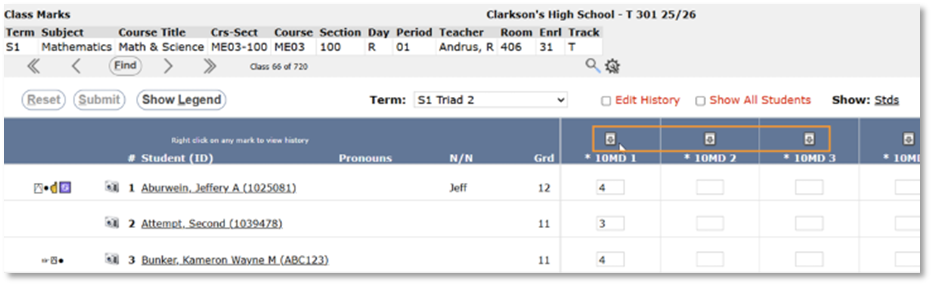
When this preference is enabled, users can utilize the mass-fill arrows to overwrite calculated standard marks for multiple students at once, as well as saving time by reducing manual entry if entering a score prior to one being calculated.
How to Enable It
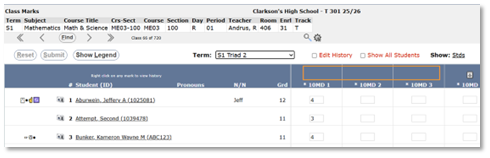
The preference to enable this feature can be found in the Preference Editor and is labeled Allow mass Filling of Calculated Standards. 
- Example of Class Marks when the preference is enabled:
- Example of when the preference is disabled:
Important Notes:
There is an interaction between two preferences to be aware of:
- If “Allow editing of calculated marks” is OFF
- But the option to mass fill calculated standard marks is ON
The mass-fill arrows will still appear, however users will not be able to mass fill any standard mark that is set to be calculated.
Essentially, If calculated marks are locked from editing, they cannot be mass filled, even if the arrows are visible.
Additionally, If a mark is edited in Student or Class Marks, and the associated Gradebook scores (set to calculate that mark) are changed, the manually entered mark will be overwritten by the calculated value.