
The Patrons application is used for those individuals who participate in a school’s food services program but who are not present in either the Student or Staff Editors. These are individuals whose participation is more frequent than that of an occasional visitor, enough to justify maintaining an account (to allow prepay and / or charging), or whose meal service must be recorded due to participation in free / reduced Child Nutrition programs.
Patron Consumer types are typically Student, Faculty / Staff, Adult, or Child.
The Patrons application is a Banner application. You may search for patrons in the application by using the arrow keys or the find function.
Food Service Patrons is located under the Food Service PoS menu in Q.
Characteristics:
If a District-wide database is in use, a Patron is…
Not present in the Student Editor for this school or any other school in the district.
Not present in the Faculty Editor for this school or any other school in the district.
Needs/wants to maintain a Food Service account, for convenience or for free/reduced/paid reporting.
Examples:
Students who are not currently present in the Student Editor but who will be when their enrollment into the district is completed.
Students attending an off-site school, such as Head Start Pre-School.
District Staff
Student Teachers
Parent Volunteers
Faculty spouse or child.
When a District-wide database is in use, Enrollment and Eligibility figures are automatically adjusted (for Food Service purposes only) for Student Patron Meals when these patrons receive meals from schools other than the ‘home’ school. Enrollment and Eligibility Adjustments are clearly shown on the Daily and Monthly Eligibility Summary Reports.
If a District-wide database is not in use (this is a stand-alone school), a Patron is:
Not present in the Student Editor for this school
Not present in the Faculty Editor for this school.
Needs/wants to maintain a Food Service account, for convenience or for free/reduced/paid reporting.
Examples:
A student who is enrolled at another school in the district but receives meals from this school.
Students who are not currently present in the Student Editor but who will be when their enrollment into the school is completed.
Students attending an off-site school, such as a Head Start Pre-School.
District Staff
Student Teachers
Parent Volunteers
Faculty spouse or child
Patron records are maintained in Food Service Accounts, Patron Accounts. If the Patron is a Student, he/she is automatically assigned Paid Status, which may be changed to Free or Reduced. Patron bar codes and other documents are printed from Food Service Reports/Letters & Labels.
Ident – The next available ID number (highest plus 1) is supplied automatically but may be overwritten. If a district-wide database is in use, Patron ID numbers are district-wide and are unique though-out the district.
To add a new Patron:
- From the Patrons application, click Add Patron.
- The Patron Editor will open.
Patron ID: The Patron ID field will be populated with the next unique Patron ID value available. If a value is manually entered that is already in use, an error message will be displayed when trying to save the record.
Patron Name: Enter the Patrons First, Middle (optional) and Last Name.
Location/Status: This designates a specific school as the primary eligibility site for this patron. If a student patron with this configuration receives a meal from a different school, his eligibility for the meal is deducted from the first school and added to the second school.
School = Unset indicates the patron does not have an established ‘home’ school for meal eligibility purposes.
If School = Unset, then Eligibility may be:
- When Served – this patron’s eligibility is included only when a meal is recorded, or
- Never – this patron is never included in eligibility figures
Type – The Patron Consumer Type determines IF a patron’s meal eligibility is included in the school’s eligibility.
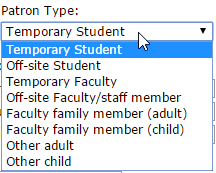
Temporary Students and Off-site Students – May be Free, Reduced or Paid. Meals served to Temporary Student and Off-site Student Consumer types are included in Eligibility figures unless Eligibility = Never.
Temporary Student – Use for students who will be enrolled in the school but who are not yet present in the Student Editor. When enrollment is completed for a Temporary Student Patron, food service activity is transferred from Patron Accounts to Student Accounts. Patron records and Patron Account data are deleted.
Off-Site Student – Use for students who are enrolled in an off-site school, such as Head Start school. Remaining Consumer types define meals for reporting purposes. Meal eligibility does not apply to the following consumer types.
Temporary Faculty – Use for student teachers, substitute teachers, or temporary faculty who may potentially transfer to a permanent faculty position.
Off – site Faculty / staff member – Use this consumer type for district staff.
Eligible – This setting controls how student patron eligibility is calculated.
- Eligible = Never for all non-student patrons (default setting, read only).
- Every day = Student Patron is eligible for meal service every day, and is included in enrollment before the enrollment is adjusted by the attendance factor. Patrons designated as Type = Temporary Student and Eligible = Every Day are essentially the same as enrolled students for food service eligibility purposes.
If a Student Patron is Eligible = Every day, and receives a meal from a different location, that students’ eligibility is deducted from the first school’s attendance factor adjusted eligibility (for the meal only), and added to the other school’s attendance factor adjusted eligibility (for the meal only).
When served – This Student Patron is eligible only when a meal is served. Student Patron eligibility is added to the school’s attendance factor adjusted eligibility each time a meal is served. These patrons are eligible only if a meal is received, and only for that meal at the service site. This setting is designated for student patrons who are served by multiple sites. A specific school may not claim them as eligible every day, therefore the site that provides the meal receives the eligibility for the meal.
Never – Meals are not eligible for reimbursement.
Patron Demographics
The next available ID number (highest plus 1) is supplied automatically but may be overwritten. Remaining Patron demographic fields. Address information is not required, however it is recommended if you intend to print documents for patrons. Gender and Ethnic are used for reporting purposes. Patron Language is referenced when Patron documents are printed. If a patron’s language is left unset, the English version of the document will be printed.
Other Patron Information
Notes – An optional text entry field for notes specific to this patron.
Picture – Pictures can be uploaded for Patron accounts. To upload a picture for a patron, click Patron Picture. Click Choose File to navigate to the desired picture. Click Done to exit the image editor and Submit to save the changes.
Once all information has been entered, click Submit to save the Patron record.
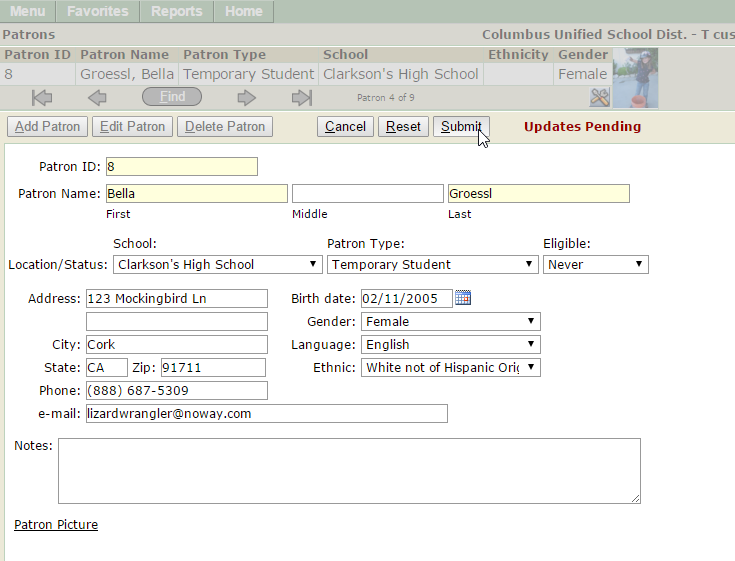
Navigate to the Patron using the arrow keys or the find function. Click Edit, make any necessary changes, click Submit to save the changes, Reset to clear any changes made since a previous save, or Cancel to return to the previous page.
Navigate to the Patron using the arrow keys or the find function. Click on the Delete button. If no activity exists for this patron, the record may be deleted. If activity is present, the record may not be deleted.
