
Districts may allow student and contact information to be updated through Parent Connection. When parents update information for their student or themselves, the changes must be confirmed by a school site administrator.
Note
Contact Confirmation will also include contacts who have been modified by their spouse but do not have access to any students in Parent Portal.
The Contact Confirmation application is used by administrators to review these changes and update the official student and contact records in the database.
Contact Confirmation is located under the Enrollment menu in Q.
When changes are submitted in Parent Connection to student or contact information, the updates are placed in a holding area pending confirmation by school administrators.
Upon launching the Contact Confirmation application, a list of pending changes is displayed. Users can click a Contact/Student name to see pending changes.
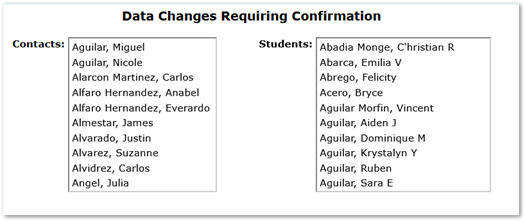
The No Changes Dialogue will display if there are no pending changes.
Once a Contact/Student is selected, information will be displayed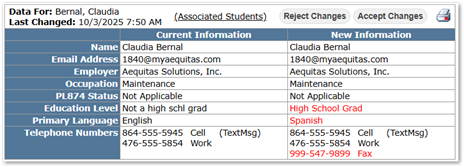
- Data For: Name of the Contact/Student to be changed.
- Last Changed: Date of the last data change.
- Associated Students Link: Clicking this will display the Contact’s Students within the District.
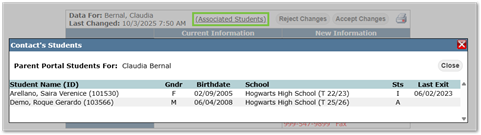
Note
Contacts with no student access appear when a spouse with access makes changes to their account information. For these contacts, the system displays “No Associated Students.”
- Current Information vs New Information Table : Allows users to compare the changes in data. Pending changes will display in RED in the New Information column.
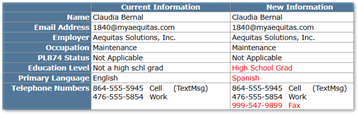
- Reject/Accept Changes: Users can choose to Accept or Reject changes.
- Print Button: Users can print a copy of the Current/New information table for their records.
