
Does your school need to remind teachers to take attendance? Is it hard to see what classes have taken attendance, and what classes have not? Fear not! In today’s Q Tip we will look at the Class Attendance Monitor, and how it can help your attendance office ensure that attendance is taken regularly.
The Class Attendance Monitor looks at the class scheduled for a day and will display the attendance status for those classes color coded based on whether attendance has been submitted for that period.
Classes highlighted Red still need to have attendance submitted. Classes highlighted Green have had their attendance submitted.
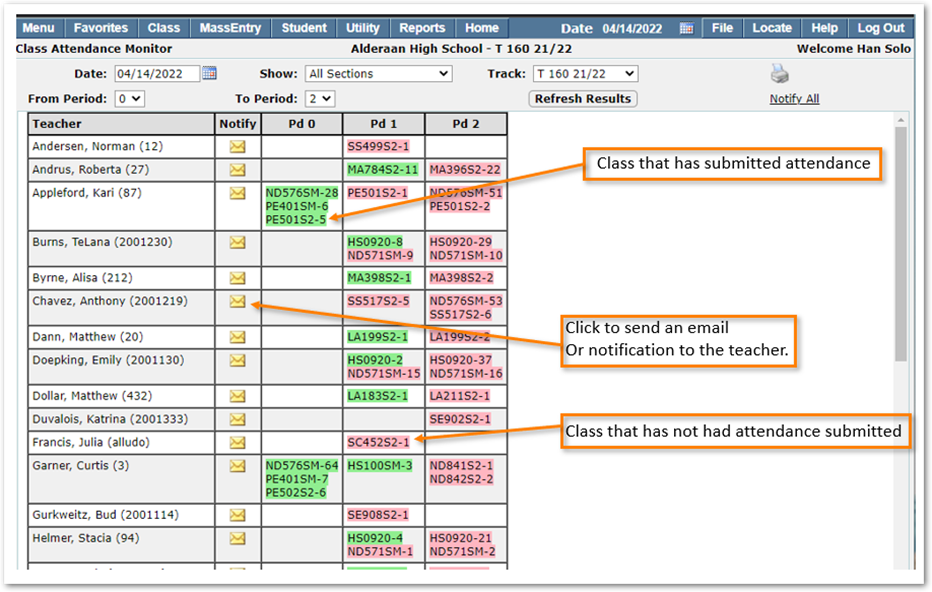
Clicking on the Envelope icon will send an email, or an internal Q notification to the teacher depending on district preference setting.
At the top you can change the filters to show only specific periods in the day or change the date to review attendance status for the previous day. You can choose to show all class sections, only Non- Reporting Sections (Classes that have not submitted attendance) or Reported Sections (Classes that have submitted attendance).
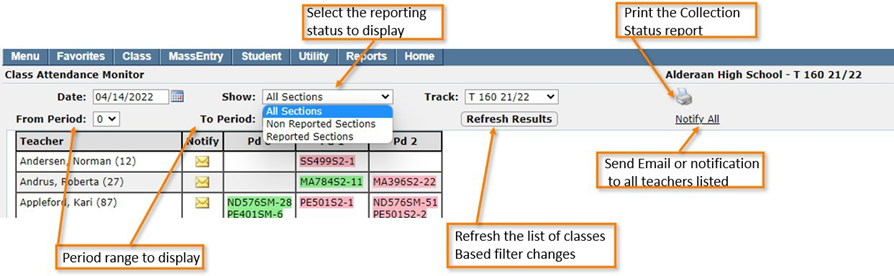
TABLE OF CONTENTS
- No headings available. Use Paragraph Format to add one.