
As we approach the end of the school year—or for some districts, now that it's already concluded—it’s important to consider student retention before running the Year End Process.
Why This Matters
Many districts completed their New Year Process back in December through March. At that stage, it’s difficult to determine which students should be retained due to the amount of the school year remaining.
We recommend that districts promote all students by default, unless a student has clearly been identified for retention.
Option 1: Retaining Individual Students
If you know a specific student needs to be retained, the easiest method is to manually flag them in Student Editor.
Steps:
- Go to School Information within the Student Editor.
- Check the “To Be Retained” box.
That’s it! The student will remain in the same grade and school when the New Year Process is run, or when Year End Process is run.

Option 2: Retaining Students in Bulk (Mass Retain)
If you need to retain multiple students, the Mass Retain feature (found in the Year End Process application) is available to help with this.
How to Use the Mass Retain Tab:
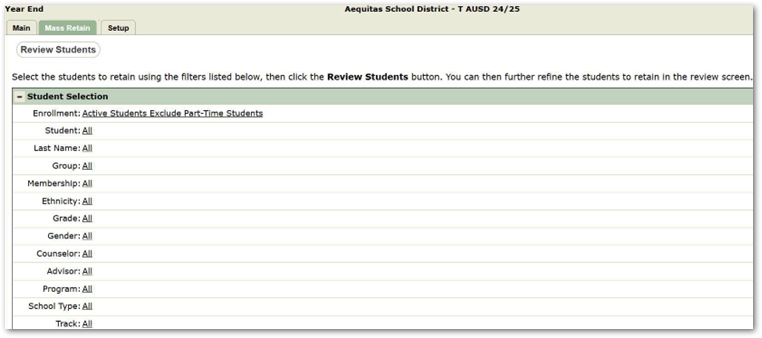
- Navigate to the Mass Retain tab in the Year End module.
- Use the Student Selection filter to choose the students to retain. NOTE: Select Active Students and exclude Part-Time Students. Do not include inactive students.
- Click Review Students to confirm the correct selection.
Before Finalizing:
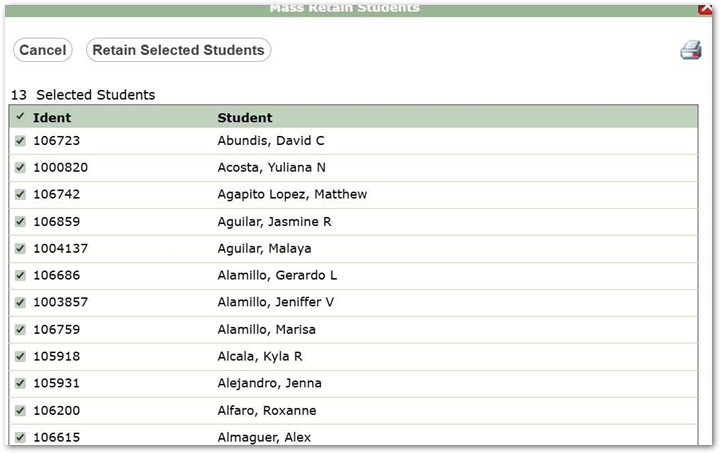
- Each student will be auto-selected by default.
- Uncheck any students you do not wish to retain.
- Print the list of students being retained for documentation.
- Click Retain Selected Students.
This automatically flags them as retained in Student Editor, just as if it were done individually.
After the Year End Process is Run
Any student flagged for retention will:
- Be returned to their original school and grade level.
- Have the “To Be Retained” flag reset to unchecked in Student Editor.
This ensures a clean transition into the new school year while accurately reflecting retention decisions.
New in Q 4.3.0
The Mass Retain tab is now available within the New Year Init application, allowing users to retain students in bulk before running the New Year Process—without having to use the Year End module.