
When printing report cards, there are three available options in report card setup to address report cards to: Parent or Guardian, Contacts, and Contact or Parent/Guardian. Today’s tip will cover expected results with each of these options.
- When selecting to address to Parent or Guardian, all students will always receive a report card generated that will be addressed to mailing/home address.
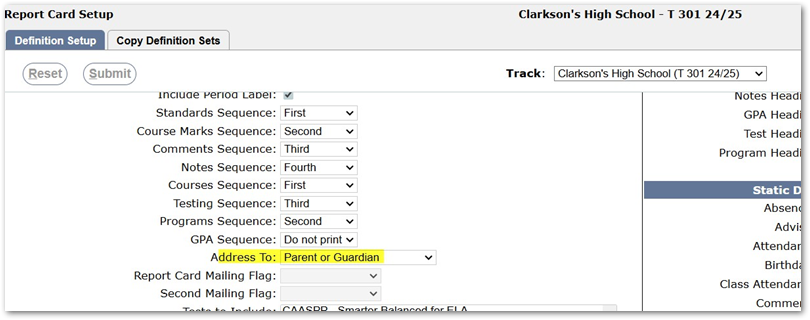
We check first to verify if there is a mailing address - if one does not exist then we will address the report card to the home address.
2. When selected to address to Contacts with a specific conmail flag selected, the report card will do a check to see which primary contacts have the defined conmail flag set.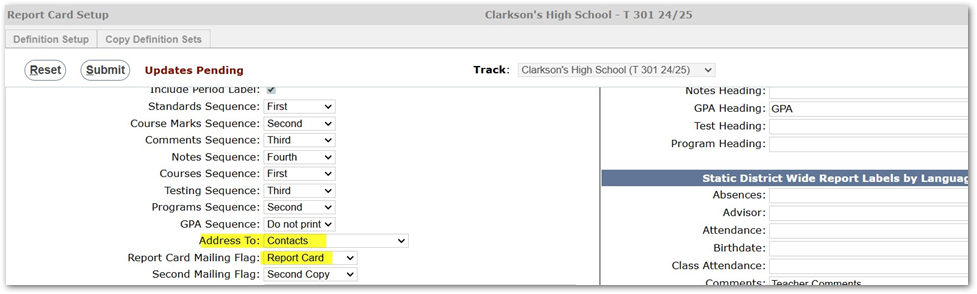
If there are multiple primary contacts with the selected conmail flag, they will all receive a hard copy of the report card unless you have turned on the option to Exclude Waiver Contacts and one (or both) primary contact has opted out of receiving a hard copy of a report card (through Parent Connect).
Note
These records are stored in the table called norptcard by conuniq for each suniq they have opted out of a hard copy for.
3. The third option is to address to Contact or Parent/Guardian.
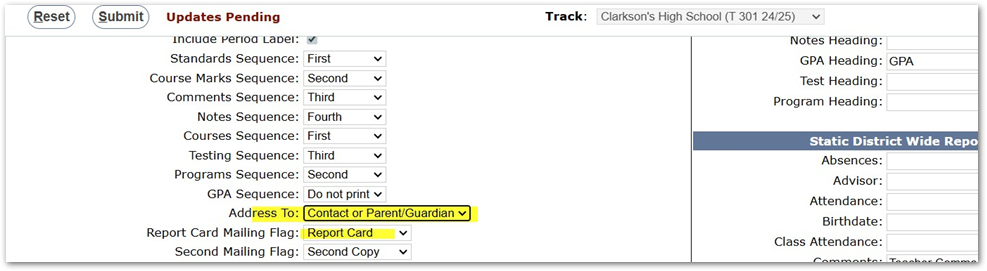
This selection is meant to be a 'catch-all' if you will. What this option does is first check to see if there are any primary contacts who meet the conmail flag selection to have a report card generated directly to the contact and will do the same checks as in option 2 above (when addressing to Contacts). If a student DOES have a contact with the conmail flag selected and no report card waiver selected, that contact will receive a hard copy. If the report card waiver is on for the returned contact, and the report option is selected to exclude waiver contacts, a hard copy will not be generated.
If the student has no contacts that meet the selected conmail flag, this is where the catch- all comes into play. We will generate a report card addressed to the Parent/Guardian of the student, sent to the student’s home address (or mailing address if one exists on file).
This option is to ensure all students get a report card generated, in the case there is a contact that may not have the report card mailing flag turned on when they should have.
The 'Exclude Waiver Contacts' option will only be honored when the Address To field is set to Contacts or Contacts or Parent/Guardian.
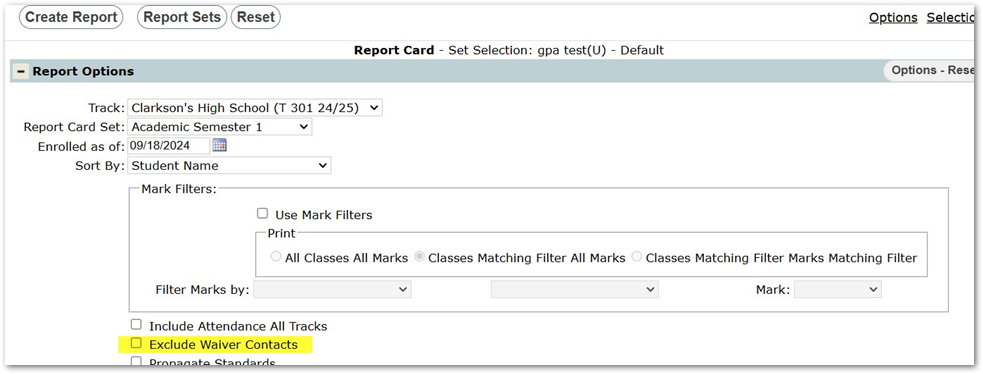
When generating report cards, if you want to exclude waiver contacts from hard copies, our suggestion is to: First, run report cards for ALL students with the option turned on to Save to Documents. This will ensure all students receive a pdf version of report cards that can be viewed on the portals. Then, do a second run of report card generations, and select a report card set that is defined to address to 'Contacts' for a given mailing flag and you can then turn on the option to Exclude Waiver Contacts. This will ensure any student will get a report card generated for contacts that have been set to receive report cards, but will ONLY print for contacts who have not opted out of a hard copy.