
Did you know that Q has mobile student ID cards?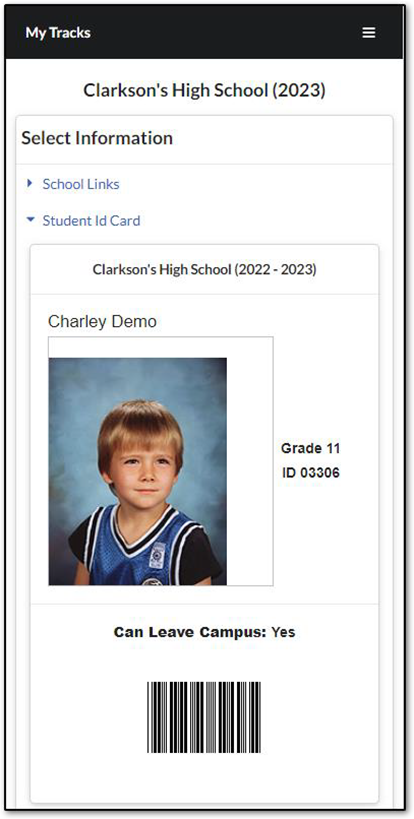
The student ID card can be setup as a module in StudentConnection.
It will ONLY display in the StudentConnection mobile pages (Q StudentConnection mobile app or when viewing StudentConnection via a mobile browser).
By default, the card includes the student’s name, picture, grade, ID, and barcode. However, the card can be customized using SQL to return whatever sort of custom data you would like.
Setup
To set up the mobile student ID card you must first download and run two scripts from the Aequitas File Manager site. The scripts can be found under Tools > Mobile Student ID Card.
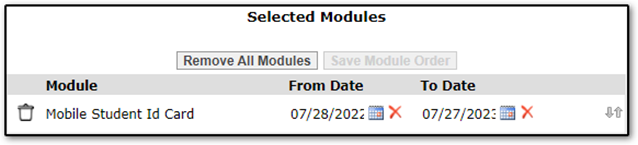
Run the first script: xd_FieldSet_stumods_StudentIdCard.sql. Once this has been run you can go into StudentConnect Manager within Q and assign this module to the tracks where students should have access to the mobile ID card:
The second script, sp_qStudentConnectStudentIDCardCustom, will create the procedure that builds the custom portion of the ID card to display below the student picture. This procedure is where you should write any customizations.
The procedure accepts @studentid and @trackid parameters so that the card can be customized by student and/or track.
The procedure returns a customdata string. This string can include HTML tags.
In the above screenshot, you will notice there is a label below the student’s picture that says, “Can Leave Campus: Yes”. This is the customized portion of that particular card. I created an xstudemo bit field to represent whether the student should be allowed to leave campus at lunch. The procedure then returns a string to display that value and it is wrapped in HTML <b> tags.
Hopefully my simple proof-of-concept gives you some ideas of how you can take advantage of the mobile ID cards. If you customize your card, I encourage you to share your creation back with the Google Group!