
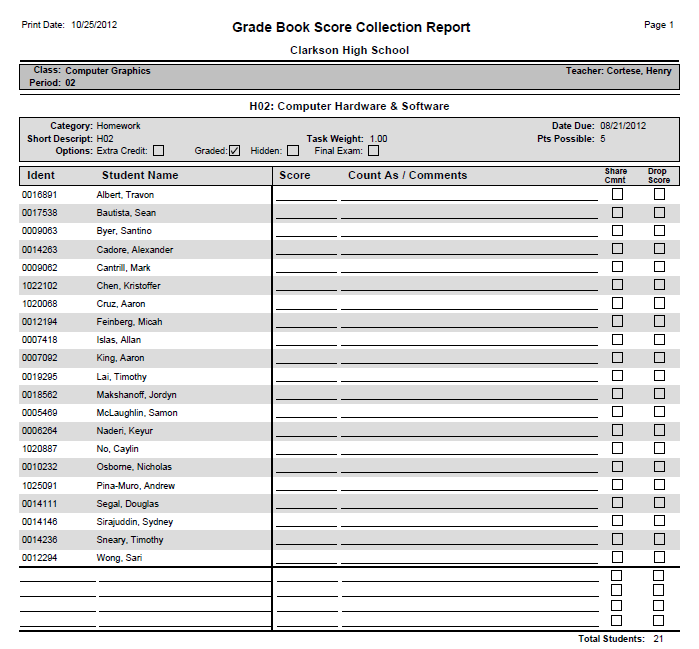
The Grade Book Score Collection report produces a form for manually collecting and recording scores when computer access is not available. A roster of students for the selected class is provided, with blank spaces for entering scores.
While details specific to this report will follow, users can find general information about reports within the Reports documentation. Most reports also include selection filters, and users can learn more about them in the Selection Filters documentation.
Report Options
The Grade Book Score Collection report provides the following options: 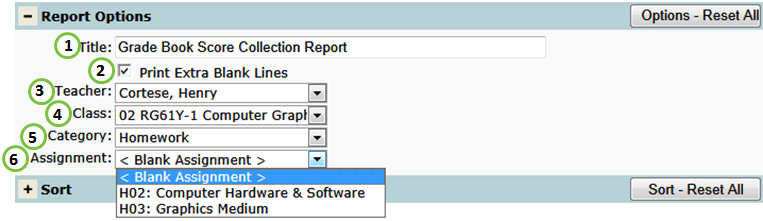
- Title - include a custom title or leave at its default title.
- Print Extra Blank Lines - include for blank lines for new students.
- Teacher - select a desired teacher.
- NOTE: Only teachers who have set up their grade book will be available.
- Class - select a desired class.
- NOTE: Only classes who have at least one grade book assignment will be available.
- Category - select a particular grade book category to filter the report by.
- Assignment - create a Blank Assignment form used to collect scores for any assignment or select a specific assignment. If selected, the form will include Category, Date Due, Short Description, Task Weight, Points Possible and Assignment Options: Extra Credit, Graded, Hidden, or Final Exam.
Example Reports
Videos