This application enable the user to record Medications given for multiple students in one instance.
Note:
Mass Medications is only useful when you have students that have medications set up in the Student Health app. If you have no students with medications, Mass Medications will be empty.
Mass Medications is located under the Health menu in Q.
Note:
If the medication is set to be administered by a particular staff member (such as the school nurse), said staff member will be the only one with access to log that they have administered a dosage.
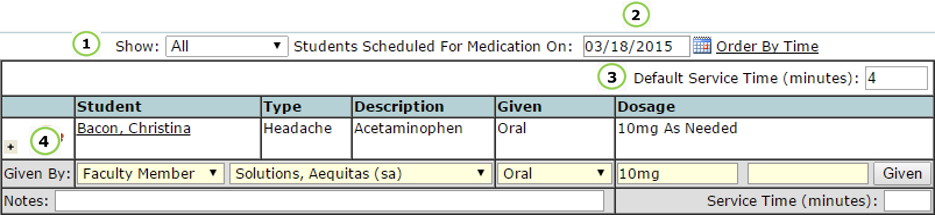
1) Show – All, Scheduled, or Non-Serviced medications will display
2) Date – Select date to see available medications to be given on selected day. You will only be able to log medications as given on the system date. You may view future and past medications, but not log them as given.
3) Default Service Time (minutes) – Set the service time (the visit length for the student), the default is set for 4 minutes, but is customizable. You may also manually enter the service time per student visit, in the lower right corner of each medication log.
4) Given By: Choose between: Health Contact (Doctor), Faculty Member (default), Student Contact (usually a family member or guardian), or Other (blank field appears). For each of these options, the adjacent drop down will allow you to select the party or agency administering the medication.
Note:
In the Mass Medications app, any Staff member that has the ‘Student Health [Medications]’ permission will be able to log medications as given, or be selected in the drop down menu as the one administering the medication.
Confirm the medication is correct for each student before proceeding.
1) Notes: Enter in any notes you may have about the student receiving the medication.
2) Press ‘Given’ to log the medication as being given right now, and to set the Service Time to whatever time you have in your default setting, in the top right corner of the app. If you are logging a group of medications after they have been administered, manually enter in the time of medication given for each student. If errors are made, you are able to reset each medication individually, to avoid erasing correct logs.
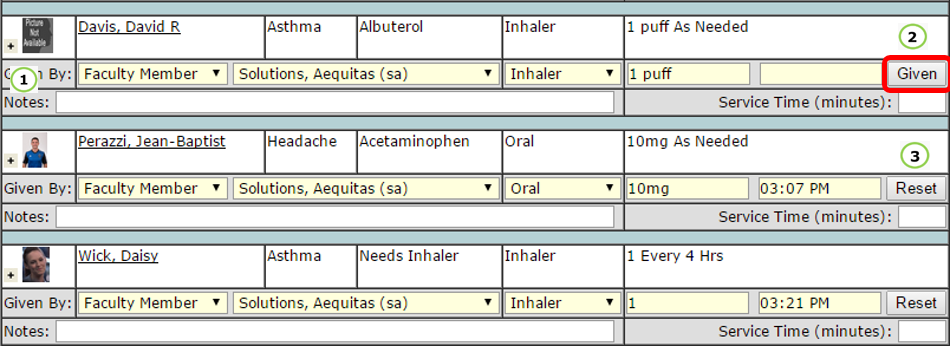
3) Reset: only appears once a Time Given has been entered. The reset function is on a per student basis, to prevent the user from resetting correct logs.
Medications that are logged correctly will appear in 2 places: at the bottom of each medication listing in the Mass Medications app:

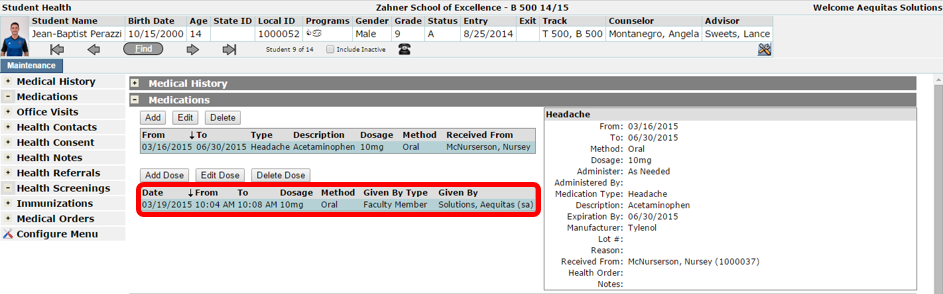
and in Student Health, in the Medications tab: