
To restrict the visibility of specific values in Q for users accessing the Student Profile—namely Parents and Students—we’ll walk through how and where these settings can be configured.
This functionality exists to protect sensitive data that should not be visible to all user types. For example, Attendance Codes: most districts using Q or MISTAR-Q designate a default code such as “Present.” Typically, students are marked Present by default, and teachers update this status to reflect Absences, Tardies, etc.
In the Student Profile and Parent/Student Connect, attendance details are displayed by date, period, reason, course, and teacher. Since “Present” is the default, it usually doesn’t appear. However, if a teacher mistakenly marks a student as Absent and later corrects it to Present, the system logs this change. This can cause confusion for parents who may interpret the single “Present” entry as the only time their child was marked present.
To prevent this, you can suppress the display of the “Present” code by editing its sequence value in the Attendance Code setup. Assigning a sequence of 900 or higher will hide it from the Attendance Details section in Student Profile and Parent/Student Connect.
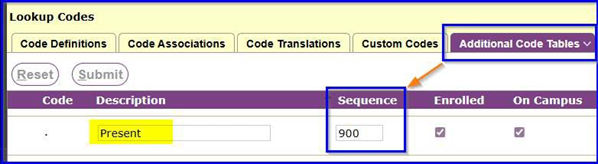
Other areas of the system that allow for the same suppression of specific values.
Lookup Code Editor
GPA Type – Schools may use GPA Types for internal purposes like Math GPA, yet they do not want this GPA Type to be shared in the Student Profile, Parent and Student Portals.
Test – If there are any Tests that are used internally, but shouldn’t be shared to Student Profile, Parent or Students the value of 900 or greater will hide the entire Test, Sub-Test and Score Types.
Test Score Type – Some tests can be shared, however many tests can have multiple test score types and some of these may have no meaning to parents and students, so we can hide the test score type, but still show the test, sub-test and other score type.
Test Definition
Setup Tab allows Adding, editing and deleting of Tests, Subtests and Test Score Types. In this area users can set the sequence value to be 900 or greater in any one of the three areas mentioned. NOTE: Both Test and Test Score Type can be altered here or in Lookup Code Editor, however Subtests can only have the sequence changed within Test Definition.
900 or greater sequence on a Test – Hides the test
900 or greater sequence on a Subtests – Hides the test record that is associated to the subtest but will still show other subtests associated to the test.
900 or greater sequence on a Test Score Type – Hides the Test Score Type for a test / subtest but will show the other test score types.