
This document provides details about the Q data extracts and imports available to our California customers.
Contains links to data guides, code sets, valid code combinations, and file Specifications.
- Aequitas CALPADS Mapping Guide (EXCEL) (Right click, Save link as, Keep)
CALPADS Submission Overview - A chart of extracts for each submission, including links to the CALPADS documentation for each submission and the CALPADS calendar.
The first tab in the State Reporting application includes the extracts necessary for CALPADS. 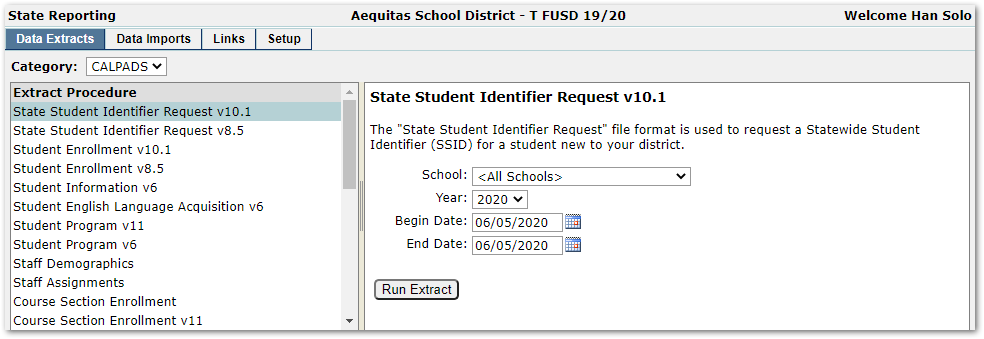
State Student Identifier Request (SENR) – Used to request a Statewide Student Identifier (SSID) for students new to the district.
Student Enrollment (SENR) – Used to manage student enrollments. It should be run regularly to keep enrollment information current in CALPADS.
Student Information (SINF) – Used to submit demographic information about each student. It should be submitted when a student is assigned a new SSID and any time demographic data changes.
Student English Language Acquisition (SELA) – Used to submit English Language Acquisition information about a student including Primary Language, ELA Status, and ELA Status Date. It should be submitted when a student's ELA Status changes.
Student Program (SPRG) – Used to submit program information about a student. Program eligibility or participation data is submitted depending on the specific program and time of the collection.
Staff Demographics (SDEM) – Used to submit demographic data about a staff member. Only active employees at any time during the current academic year should be included in the submission.
Staff Assignments (SASS) – Used to submit assignment data about a staff member. Only active employees should be included in the submission.
Course Section Enrollment (CRSE) – Used to submit course section data. Course enrollment data must be submitted in the fall. Course section information should be included for all course sections in which students are enrolled as of Information Day.
Student Course Section Enrollment (SCSE) – Used to submit student course section data. Student course enrollment data must be submitted in the fall. Student course section information should be included for all course sections in which students are enrolled as of Information Day.
Course Section Completion (CRSC) – Used to submit course section data. Course completion data must be submitted at End of Year. Course section information should be included for all course sections that were completed by at least one student during the school year.
Course Section Completion - After Yr End (CRSC) – Used to submit course section data. Course completion data must be submitted at End of Year. Course section information should be included for all course sections that were completed by at least one student during the school year. This process should only be used if the district has run the Populate_xtrnscrpt_CALPADS prior to year end.
Course Section Completion – NoStuRcd (CRSC) – Used to submit course section data. Course completion data must be submitted at End of Year. Course section information should be included for all course sections that were completed by at least one student during the school year. This process should only be used if the district has run the Populate_xtrnscrpt_CALPADS prior to year end.
Student Course Section Completion (SCSC) – Used to submit student course section data. Student course completion data must be submitted at End of Year. Student course section information should be included for each course completed by a student during the school year.
Student Course Section Completion - Aftr YrEnd (SCSC) – Used to submit student course section data. Student course completion data must be submitted at End of Year. Student course section information should be included for each course completed by a student during the school year. This process should only be used if the district has run the Populate_xtrnscrpt_CALPADS prior to year end.
Student Course Section Completion - NoStuRcd (SCSC) – Used to submit student course section data. Student course completion data must be submitted at End of Year. Student course section information should be included for each course completed by a student during the school year. This process should only be used if the district has run the Populate_xtrnscrpt_CALPADS prior to year end.
Student Discipline (SDIS) – Used to submit information about student discipline incidents and truancy.
Student Waivers (SWAV) – Used to submit waiver information about a student.
Student Career Technical Education (SCTE) – Used to submit Career Technical Education (CTE) information about a student.
Student Address Changes (SIAD) – Same format as the SINF but used to submit address changes only. It relies on the StudentAddressHistory table which is only maintained by the "new" Q Student Editor.
Student Mailing Addresses (SIAD) – Same format as the SINF. This version sends only students with mailing addresses that are different from home addresses.
Student Absence Summary (STAS) – Used to submit Student Absence Summary information for the entire school year.
Postsecondary Status (PSTS) – Used to submit employment and educational status after completing secondary education in the prior academic year for those students who were involved in CTE or CA Partnership Academy programs.
Student Incident (SINC) – Used to submit student incident information for discipline and instances of restraint or seclusion.
Student Incident Result (SIRS) – Used to submit student incident result information for discipline incidents and instances of restraint or seclusion.
Student Offence (SOFF) – Used to submit student offense information for discipline incidents.
Local Educational Agency Program (LEAP) – Used to submit Expanded Learning Opportunity program information about a student.
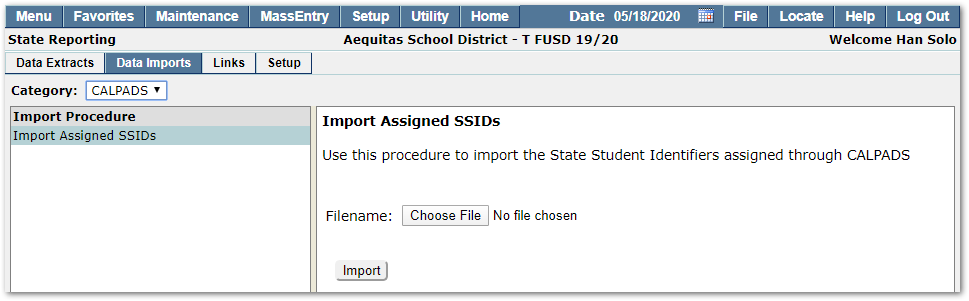
Currently, the only supported data import is for Statewide Student Identifiers (SSIDs) assigned through CALPADS. To import SSIDS, choose the file from a local drive and then click the Import button.
Information on configuring Q to support CCGI Extracts and the excel file of the CCGI Data Mapping may be downloaded below.
- CAPSDAC to Q Mapping Guide (EXCEL) (Right click, Save link as, Keep)
Support for CAPSDAC includes extension fields and the Extension Editor definitions to maintain them, Lookup Code Categories, a Code Association, and three extract procedures in the State Reporting application.
Use Lookup Code Editor to set the appropriate Code Association value(s) for CAPSDAC_facalttyp (Alternate Faculty Types to include in CAPSDAC reporting).
CAPSDAC uses different code sets for some of the fields that are already used by CALPADS. Thus, districts need to use Lookup Editor to add Code Translation Sets for zjob_CAPSDAC (Staff Role), zedulvl_CAPSDAC (Staff Highest Degree), and zethnic_CAPSDAC (Staff and Child Race). Please refer to documentation found at https://www.cde.ca.gov/sp/cd/ci/capsdacsupportlanding.asp to find the CAPSDAC code sets.
CSPP (CA State Preschool Program) tracks can be configured in one of two ways: 1) a school for each CSPP site, or 2) a track within an existing school for each CSPP site. If option 1 is used, turn on the CSPP flag in the School Editor and the school StateID will be used. If option 2 is used, turn on the CSPP flag for the track in the Track Editor and put the appropriate CDS code for the CSPP site in the StateID override field in the Track Editor.
